
At the 2026 Worldwide Developers Conference (WWDC), alongside highlights about Siri AI and new operating system updates for iPhone, iPad, and Mac, Apple continues to enhance its child control tools in a simpler and more intuitive way with the guidance of safety and health experts, helping parents create a safer, richer digital environment for their children.
Easier Setup for Child Accounts

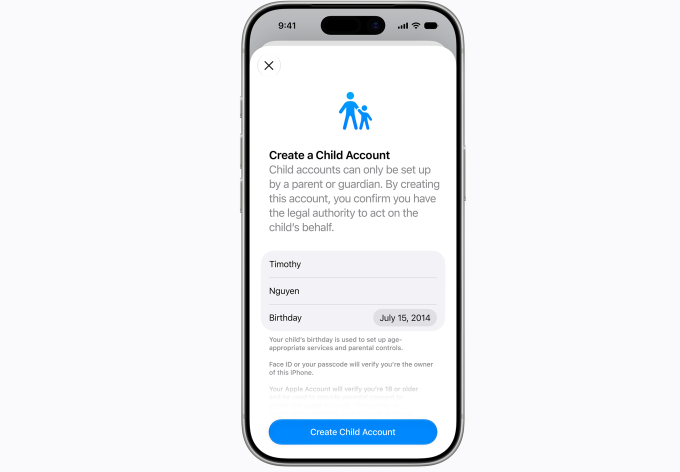
Apple’s interface for creating child accounts. Image: Apple
Creating a child account is the first step for parents to tailor the device usage experience according to age. Apple implements a system-wide account creation and management mechanism, including restrictions on adult websites, age-appropriate content control, and setting age limits on the App Store. When setting up a new device for a child, parents will be guided to create a child account, which is mandatory for children under 13 and can be used until they turn 18.
Content Control for Children

Setting up accessible applications from the start. Image: Apple
After creating a child account, parents need to decide which applications the child can use on the device, starting with basic applications, a selected app list, or only permitted apps. Over time, parents can add new software and maintain decision-making power over each change.
As the child’s device usage increases, parents can expand access through the Ask to Buy feature. This function requires the child to obtain adult approval before downloading apps from the App Store, whether they are free or paid, as well as before making in-app purchases. Additionally, the Ask to Browse feature allows parents to require children to ask for permission before accessing a new website on Safari. This new mechanism works seamlessly across iPhone, iPad, and Mac.
Control Over Child Communication

Parents can control who children can communicate with via Messages, FaceTime…
From the initial setup of the device, parents can manage the list of people their child is allowed to contact through Messages, FaceTime, and Phone. When the child wants to connect with a new contact, they must request permission before starting the conversation.
The Communication Safety feature, which is used to detect and blur images or videos containing nudity in Messages and FaceTime for users under 18, is now expanded to identify violent or frightening content in shared photos and videos. When such content is detected, the system issues warnings and intervention measures before the user continues to view it.
Access Time Management

Time Allowances help set usage time for children. Image: Apple
The Time Allowances feature provides tools for managing application usage time by content group, such as entertainment, games, and social media. During setup, the system suggests limits based on research about device usage habits for children at different ages, allowing parents to apply initial limits and adjust them according to their child’s actual needs.
Furthermore, parents can set daily parameters to define which applications the child is allowed to use at specific times of the day or on specific days of the week. This setup helps control the child’s app access during times that require focus on other activities, such as studying or scheduled routines.
Support for Navigating the Digital Environment
The screen time tracking feature updates to a more intuitive interface, helping parents check the average device usage duration of their child and identify the most used applications. From the management screen, parents can change app or website access with just one action, such as temporarily restricting device use during meals, outdoor activities, or designated times for other activities.

Apple’s website interface providing guidelines for protecting children in the digital environment. Image: Apple
To enhance accuracy, Apple has collaborated with the American Academy of Pediatrics (AAP) to integrate the Family Media Plan guidelines as a reference material for parents using devices and online services while monitoring children. The company also continues to work with experts to understand the impact of technology on children and support research in this field.
In addition, to assist parents in staying updated and informed, Apple has launched a dedicated website featuring new tools, useful resources, and common content on how to manage teenagers. For developers, the company has added the SensitiveContentAnalysis and PermissionKit toolsets to protect children from inappropriate content.
New Features in Siri AI
macOS 27 Says No to Intel Chip Macs
Tim Cook Thanks 21 Times in His WWDC Speech
Vietnamese Images Featured Multiple Times at the Apple Event
Apple Introduces iOS 27, Supporting iPhone 11