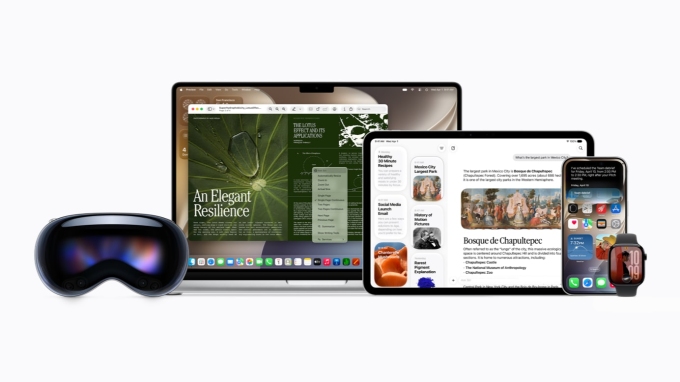

At the Worldwide Developers Conference WWDC 2026, held on June 8 in the USA, one of Apple’s main focuses was the introduction of the new Siri AI – a version of Siri that has been described as a “transformation” thanks to the deep integration of Apple Intelligence’s artificial intelligence functions. During the presentation, Craig Federighi, Apple’s Vice President of Software Engineering, emphasized that this version of Siri is “capable-rich, enabling users to interact with applications more naturally than ever before.”

Siri AI supports multiple platforms. Photo: Apple
A True Personal Assistant
According to Apple, Siri AI with Apple Intelligence provides answers that are detailed, engaging, and capable of natural conversation by leveraging its ability to understand personal context, helping users quickly find information through messages, emails, photos, and many other data sources. For example, users can ask Siri to find restaurant information that a friend texted them, display hotel booking confirmation codes from old emails, or compile photos taken with friends and family from a recent trip. The ability to understand personal context can extend to third-party applications when developers integrate with Spotlight.

Siri AI can answer questions related to the content on an iPhone screen. Photo: Apple
Siri AI can also function as an agent, performing more tasks across the system and between applications, thus helping complete work faster. For instance, Siri can assist in drafting emails from scratch, editing photos, or sharing a photo album just by voice. Thanks to its ability to understand the content displayed on the screen, the virtual assistant can answer questions directly related to what is being viewed.
Additionally, Siri has the capability to search for and aggregate new information from the web to answer various topics. Users can ask about the time and location of the next solar eclipse or the upcoming performance schedule of an artist in their area. Compared to before, conversations are expanded with new questions, allowing for deeper exploration of topics of interest.
Rebuilt from the Ground Up

A series of AI architectures and models have been improved by Apple for Apple Intelligence. Photo: Apple
Siri AI has been rebuilt on a new foundation, leveraging the architecture of Apple Intelligence combined with AI models running both on-device and on a self-built Private Cloud Compute (PCC). According to Apple, when a request needs to be processed on the PCC server, personal data is neither stored nor shared with anyone. The company also stated that independent experts can verify this privacy protection mechanism at any time.
Moreover, Siri AI utilizes an intelligent orchestration system that helps harness core device tools such as Spotlight indexing and App Toolbox. Most processing occurs directly on the device, allowing users better control over their personal data, thereby enhancing security.
More “Emotional”
Apple has also refined the new product after many years, stating that Siri AI is upgraded with a natural and expressive voice, significantly improving its speech recognition and dictation capabilities across the system. Users can adjust the speaking speed and expressiveness of Siri to match their personal preferences.
The Dictation feature has also been improved to convert speech into text more accurately. With certain languages, including Vietnamese, Siri AI can automatically add punctuation, capitalize, and format content while reading. Thanks to better language understanding, users can speak naturally without needing to read slowly or pause, while the recorded content remains clear and true to the original intent.
With the new architecture, Apple Intelligence has significantly upgraded its contextual understanding, reasoning, and multimodal processing capabilities. The system can understand visual content, create images, perform enhanced image editing, answer questions related to visual content, and process natural language at a deeper level than before. Some high-end devices are equipped with a more powerful model version that can generate voices, improve accuracy in transcription, and enhance language understanding capabilities.
A “Specialized” Version
For the first time, the company introduced a standalone Siri application. Users can review conversation history, continue old conversations, or start new sessions. All content is synchronized through iCloud, allowing seamless transition between iPhone, iPad, Mac, and Apple Watch.

The user’s conversation history displayed on the new dedicated Siri application on iPhone 17 Pro. Photo: Apple
With conversation history privately synchronized via iCloud across multiple devices in the ecosystem, users can start a conversation with Siri on Mac, then continue discussing on iPhone, iPad, Apple Watch, or Apple Vision Pro without repeating previously spoken content. All conversations are concentrated in one application, making it easier to follow and manage.
On Mac, Siri is directly integrated into Spotlight and the right-click menu of the operating system. Users can select any file or window and then ask Siri to analyze, summarize, or compare the content.
Visual Intelligence Everywhere
Introduced by Apple last year, Visual Intelligence is now deeply integrated into Siri AI. The new virtual assistant now possesses powerful capabilities to “understand” images and multimodal contexts, allowing users to ask questions about visual content.
On iPhone, Siri’s ability to simultaneously understand images and context is directly integrated into the Camera app, allowing users to search for information or perform tasks based on what is appearing, thus helping them interact with the world around them more intuitively and conveniently. By simply pressing the capture button, Siri will analyze the image from the camera and provide related information in real-time. For example, when pointing the camera at a dish, Siri can recognize it and provide nutritional information.
Visual Intelligence is also available for the first time on iPad and Mac, allowing for intuitive searches, questioning, and interactions on the screen seamlessly. With Apple Vision Pro, users can ask Siri AI simply by looking at what they need, including content within application windows and surrounding objects.
Smart Writing and Editing
Siri AI has been upgraded with a new Writing Tools toolkit, allowing users to create and edit content in any text input area. By simply describing what they want to write, the virtual assistant will generate an initial draft. If users want to change the content, they just need to specify their request, and Siri will adjust the text accordingly.

The content creation capability using Siri AI on Mac. Video: Apple
In certain applications like Mail and Messages, Siri AI can learn how to communicate with specific targets, thereby creating appropriate content. For instance, if users often send brief emails in bullet-point format to their manager, Siri AI can apply a similar presentation style when assisting with drafting.
In addition to content creation, Siri also provides suggestions to improve wording, expression, and text structure. Siri can automatically proofread while users input data across the system, including most third-party applications.
Calling from Anywhere
Siri AI can be accessed from various locations across operating systems, making it easier for people to interact with the assistant. On iPhone, besides the command “Hey Siri,” users can press the side button or swipe from Dynamic Island to open Siri and receive detailed answers right on the screen.
On iPad and Mac, Siri is directly integrated into Spotlight for searching information or asking questions without needing to open a separate application. The new virtual assistant is also present in the system’s context menu, allowing users to simply right-click on images, documents, or text to request explanations, search for information, or perform related tasks.
With the Apple Vision Pro glasses, Siri utilizes spatial computing capabilities to display content in the form of 3D windows within the surrounding environment. Users can place the Siri interface anywhere in space and activate the assistant simply by looking at Siri and starting to speak, thus providing a more natural interactive experience in mixed reality settings.
Bảo Lâm – Tuấn Hưng
Vietnamese imagery prominently featured at the Apple event.
Apple partners with Google to ‘revive’ Siri.
Apple introduces iOS 27, supporting from iPhone 11.